MELITTA

MELITTA

TRAVEL COFFEE

Studio

LDA

Contribution

Lead Designer
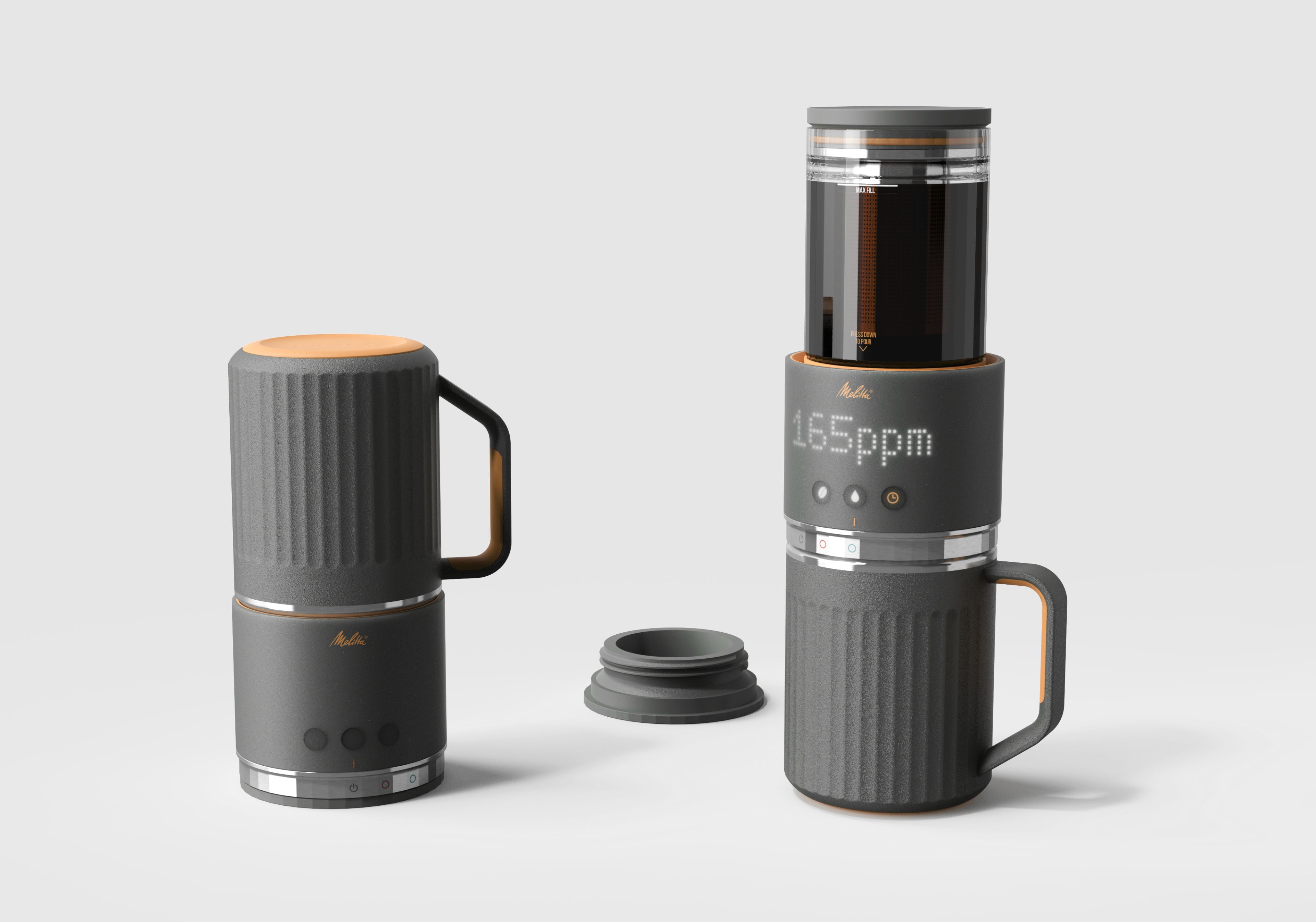
The ritual of coffee on the go.

The Melitta travel coffee maker is designed for making pour-over and cold-brew coffee out on the road. As a follow-up design to the popular Melitta Sens V Pour-Over Coffee Maker, Melitta challenged us to translate their technology into a design that would meet the needs of the rugged outdoor and camping market. This required a shift from delicate, stationary kitchen appliance to a rugged, mobile layout built for the elements. We designed the metal travel mug to double as a protective shield, inversely locking over the brew chamber during transit to isolate the fragile glass inside. Wrapped in a weather-sealed, translucent shell with capacitive touch controls and a rotating power/mode dial, the concept delivered durability and style. While shifting global market demands ultimately led Melitta to pause the program before production, the project remains a study in transitioning a brand into new markets.

Once removed from the travel case, the Melitta travel coffee maker is stored in a compact state, with the coffee mug shielding the glass brew chamber from impact.

Once removed from the travel case, the Melitta travel coffee maker is stored in a compact state, with the coffee mug shielding the glass brew chamber from impact.

Once removed from the travel case, the Melitta travel coffee maker is stored in a compact state, with the coffee mug shielding the glass brew chamber from impact.

Once the mug is removed from the top of the brew chamber the bottom dial is rotated to toggle between power, hot pour-over or cold brew coffee.

Once the mug is removed from the top of the brew chamber the bottom dial is rotated to toggle between power, hot pour-over or cold brew coffee.

Once the mug is removed from the top of the brew chamber the bottom dial is rotated to toggle between power, hot pour-over or cold brew coffee.

The coffee maker is then placed on top of the rugged travel mug. Tap the coffee bean to tare the scale and begin adding the ground coffee.

The coffee maker is then placed on top of the rugged travel mug. Tap the coffee bean to tare the scale and begin adding the ground coffee.

The coffee maker is then placed on top of the rugged travel mug. Tap the coffee bean to tare the scale and begin adding the ground coffee.

The lid is removed and coffee is added to the brew chamber with the built in scale displaying the weight to achieve the idea coffee-to-water ratio.

The lid is removed and coffee is added to the brew chamber with the built in scale displaying the weight to achieve the idea coffee-to-water ratio.

The lid is removed and coffee is added to the brew chamber with the built in scale displaying the weight to achieve the idea coffee-to-water ratio.

As the user pours water into the brew chamber, tapping the water icon displays the pour rate when brewing hot coffee and the ounces when making cold brew. In hot coffee mode tapping the timer icon displays how long the coffee has been brewing for, while in cold-brew mode the screen toggles between time and PPM (parts per million) to achieve the preferred coffee strength. The user can then manually dispense the coffee by pressing down on the top of the brew chamber or have the app auto-dispense based on their personal preferences.

As the user pours water into the brew chamber, tapping the water icon displays the pour rate when brewing hot coffee and the ounces when making cold brew. In hot coffee mode tapping the timer icon displays how long the coffee has been brewing for, while in cold-brew mode the screen toggles between time and PPM (parts per million) to achieve the preferred coffee strength. The user can then manually dispense the coffee by pressing down on the top of the brew chamber or have the app auto-dispense based on their personal preferences.

As the user pours water into the brew chamber, tapping the water icon displays the pour rate when brewing hot coffee and the ounces when making cold brew. In hot coffee mode tapping the timer icon displays how long the coffee has been brewing for, while in cold-brew mode the screen toggles between time and PPM (parts per million) to achieve the preferred coffee strength. The user can then manually dispense the coffee by pressing down on the top of the brew chamber or have the app auto-dispense based on their personal preferences.